

explorē 12 Support
Documentation
User Manuals
explorē 12 User Guide
| Englishexplorē 12 Getting Started Manual
| Englishexplorē 12 Technical Specifications
| EnglishGuide de l’utilisateur explorē 12
| FrançaisGuide de demarrage explorē 12
| FrançaisSpécifications techniques explorē 12
| Françaisexplorē Device File Back-up Procedure
| Englishexplorē 12 What’s New v1.1
| EnglishBattery Care Basics
| Englishexplorē 12 FAQ
| Englishexplorē 12 VPAT – ACR
| EnglishProcédure de sauvegarde des fichiers d’appareils explorē
| Françaisexplorē 12 Quoi de neuf v1.1
| FrançaisLes bases de l’entretien de la batterie
| FrançaisFoire aux question explorē 12
| Français
Firmware / Software Updates
Software update instructions v1.1.6
| Englishexplorē 12 v1.1.6 update
| EnglishInstructions de mise à jour logicielle v1.1.6
| Françaisexplorē 12 Mise à jour logicielle v1.1.6
| Français
Video Tutorials
explorē 12 Support Videos
| English
Frequently Asked Questions
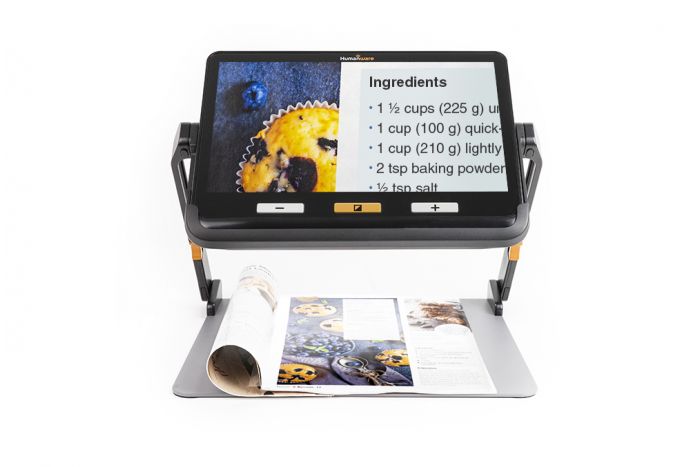
The device alone: 24 x 282 x 202 mm (0.9 x 11.1 x 8‘’) / 1134 g (2.5 lbs)
With the reading stand: 282 x 340 x 269 mm (11.1 x 13.6 x 10.6‘’) /2268 g (5.1 lbs)
Aside from their sizes, the key differences between the explorē 12 and the explorē 5/explorē 8 are an optional reading stand, touchscreen toggle between viewing modes (near and distance), and the live panning feature when the explorē 12 is in its foldable reading stand.
To charge the battery of the explorē 12, plug the proper end of the USB-C cable provided with the device in the power supply, and the other end into the USB-C port located on the left side of the device nearest the zoom and contrast buttons; this port is further identified by an orange dot and a raised plastic indicator that feels like a Braille cell.
If the device is turned on, a progress indicator showing the battery charging will appear at the upper right corner of the screen. If the device is turned off, the progress indicator will appear bigger and will be in the center of the screen. In either instance, the indicator will turn off after several seconds.
You should only use the power supply and charging cable included with the explorē 12 to ensure optimal charging of the device. If these are lost, contact your sales representative, or visit our website to purchase replacements.

Need help ?
HumanWare is here to help you.
We stand behind all of our products with service and support when you need it.