

BrailleNote evolve Support
Documentation
User Manuals
BrailleNote evolve Trade in
| EnglishDifferences between BrailleNote Touch Plus and BrailleNote evolve
| EnglishBrailleNote evolve Technical Specifications
| EnglishBrailleNote evolve Getting started guide
| EnglishBrailleNote evolve How to guides
| EnglishBrailleNote evolve Command Summary V1.1
| EnglishSetting up and using JAWS on BrailleNote evolve
| EnglishBrailleNote evolve FAQs
| EnglishBrailleNote evolve User Guide 1.0
| EnglishBrailleNote evolve Release notes 1.0
| EnglishBrailleNote evolve Teachers Training Resource
| EnglishGuide d’utilisation 1.0 BrailleNote evolve
| FrançaisNotes de version 1.0 BrailleNote evolve
| FrançaisBrailleNote evolve User Guide 1.0
| ArabicBrailleNote evolve User Guide 1.0
| GermanBrailleNote evolve User Guide 1.0
| Italian
Firmware / Software Updates
Windows 11 Drivers
| EnglishIntel Ethernet drivers
| EnglishIntel Chipset drivers
| EnglishSTM32 Cube programmer drivers
| EnglishIntel Dynamic Tuning technology drivers
| EnglishIntel Graphics drivers
| EnglishIntel Gaussian & Neural Accelerator drivers
| EnglishIntel HID drivers
| EnglishIntel Management Engine drivers
| EnglishIntel Neural Processing Unit drivers
| EnglishIntel Platform Monitoring Technology drivers
| EnglishADLink SEMA drivers
| EnglishIntel Serial IO drivers
| English
Video Tutorials
Exiting, closing and switching between applications
| EnglishMastering the New Main Menu navigation techniques
| EnglishBraille Terminal
| EnglishBraille Editor – KeyBrf
| English
Audio Tutorials
Learn. Achieve. Evolve.
Discover what’s possible with the BrailleNote evolve audio tutorial
Get to know HumanWare’s BrailleNote evolve through clear explanations, practical demonstrations and step-by-step guidance. This comprehensive audio tutorial helps you build confidence as you explore a device that brings the familiar KeySoft experience together with Windows 11 Pro.
Whether you’re a student working with teachers and classmates, a professional creating and sharing documents, or someone who enjoys reading and exploring technology, this tutorial will help you make BrailleNote evolve part of your everyday life.
Begin with the essentials, revisit topics whenever you need to, and develop your skills at your own pace.
Familiar tools. New possibilities.
BrailleNote evolve combines a braille keyboard and refreshable braille display with the flexibility of a Windows computer. You can start in KeySoft’s structured environment and explore more of Windows as your confidence and needs grow.
Discover how to:
- Navigate KeySoft, open applications and switch between tasks.
- Read, write and edit braille content using the Braille Editor
- Organise your files and folders with KeyFiles.
- Work with Microsoft Word, Excel, Outlook and PowerPoint using KeySoft add-ins.*
- Explore mathematical expressions with KeyMath.
- Enjoy books and audio content with Victor Reader.
- Browse the web and access Windows applications.
- Adjust braille, speech and navigation settings to suit your preferences.
- Connect compatible accessories and external displays.
- Develop your Windows screen reader skills with NVDA.
*Microsoft 365 requires a separate subscription.
Clear guidance for everyday tasks
Learning a new device is easier when instructions connect to the things you want to do. From finding a file to preparing a document for school or work, the tutorial takes you through practical tasks and explains the steps along the way.
The structured format makes it easy to follow topics in order or return to a particular lesson for a refresher. Pause to practise, repeat a demonstration, or move ahead when you feel ready.
If you already use a BrailleNote, you can build on familiar KeySoft concepts while learning how they work on evolve. If this is your first device, you can take time to establish the foundations before exploring further.
Build skills and confidence at your own pace
Learning assistive technology involves more than remembering commands. It’s about gaining the confidence to try something new, solve everyday problems and work more independently.
With supportive guidance and opportunities to practise, the BrailleNote evolve audio tutorial helps you turn new skills into useful habits—for learning, work and leisure.
BrailleNote evolve Audio Tutorial Table of contents
- Evolve Introduction
- What’s in the box
- Care and feeding
- First time setup on the evolve
- Evolve startup, Main Menu and navigation
- Basic commands and Keysoft options
- Evolve Main Menu configuration and contextual options
- Evolve getting help, notifications and settings
- Connecting to WiFi
- Working in Word
- Working in Outlook
- Browsing the web with evolve
- KeyBrf – Braille editor
- Victor Reader
- KeyFiles – File Manager
- All about language profiles
- Kim’s quick tips
- Troubleshooting
- Conclusion
Download the MP3 Version of the BrailleNote evolve Audio Tutorial
| English
Archive
Frequently Asked Questions
The BrailleNote Evolve is HumanWare’s next-generation note taker, designed to redefine what a modern note taker can be. Powered by Microsoft Windows 11 Professional and enhanced with the familiar KeySoft accessibility suite, it combines the performance of a mainstream computer with the simplicity and usability that BrailleNote users know and trust.
More than just a note taker, the BrailleNote Evolve is a personal computer that adapts as your needs grow. Whether you are a beginner or an advanced user, it offers a reliable, accessible, and future-ready solution, your trusted companion every step of the way. Starting from KeySoft to full window screen reader skills, the BrailleNote Evolve works around you.
With KeySoft seamlessly integrated into the Microsoft Office suite, applications like Word and PowerPoint become fully braille-driven, designed around a braille-first user interface. This approach not only enhances usability but also empowers users to be creative and productive with greater ease.
No. The BrailleNote Evolve simplifies computer use for early adopters. With HumanWare’s well-known KeySoft accessibility suite, it incorporates familiar key commands that teachers and users have relied on across both past and current HumanWare braille devices.
The BrailleNote evolve is an all in – one solution, providing a braille keyboard and display for reading and writing. In addition the BrailleNote Evolve is powered by KeySoft although not restricted, meaning it can be used by younger learners who have yet to be introduced to screen reader skills. This all-in-one solution provides a full windows computer removing barriers and fears of knowing how to operate a screen reader. Keysoft addons are also implemented withing the Microsoft Office suite to make using apps like word and PowerPoint more usable in a braille centric way.
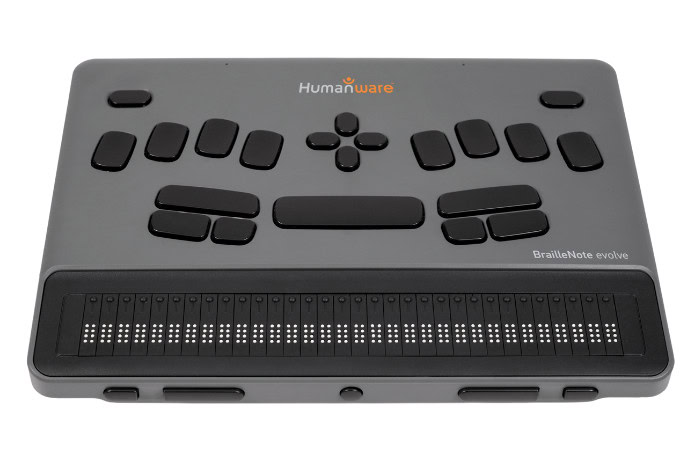
The BrailleNote Evolve is currently available in 32- and 20-cell versions, with a QWERTY model expected by the end of the 2026 year. The upcoming QWERTY version will feature 40 braille cells and a form factor comparable to the Mantis braille display. With it containing more braille cells, the price is expected to be slightly higher that the current BrailleNote Evolve 32.
Products announcements and webinars
Need help ?
HumanWare is here to help you.
We stand behind all of our products with service and support when you need it.